> ## Documentation Index
> Fetch the complete documentation index at: https://0g.mintlify.site/llms.txt
> Use this file to discover all available pages before exploring further.
# Langchain
# LangChain Integration
**Integration Status: In Progress** - This integration is currently under development. The PR is pending merge: [langchain-ai/langchain#33136](https://github.com/langchain-ai/langchain/pull/33136)
## Integration Preview
See how 0G integrates seamlessly with LangChain's ecosystem:
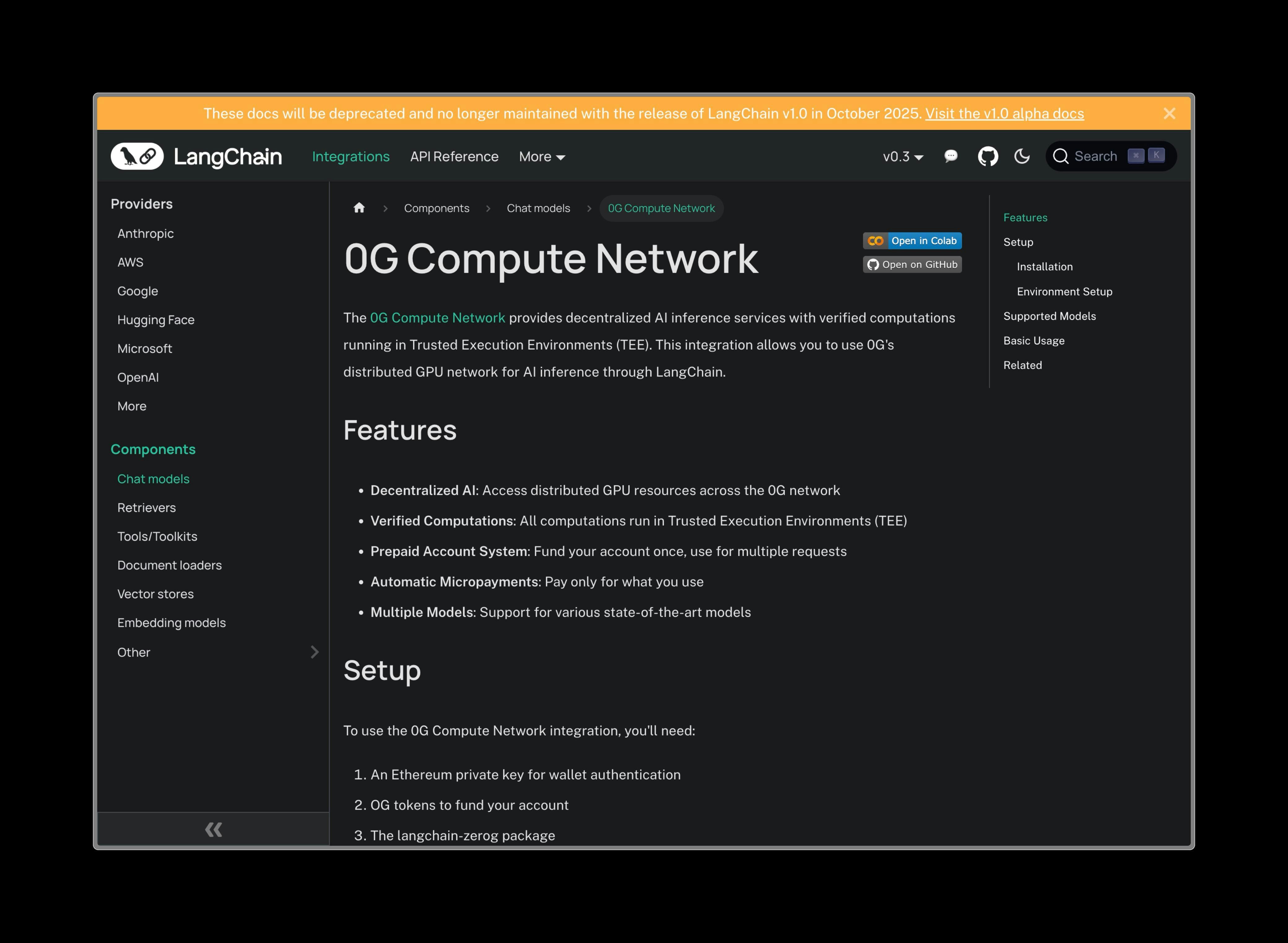 *Basic LangChain setup with 0G provider configuration*
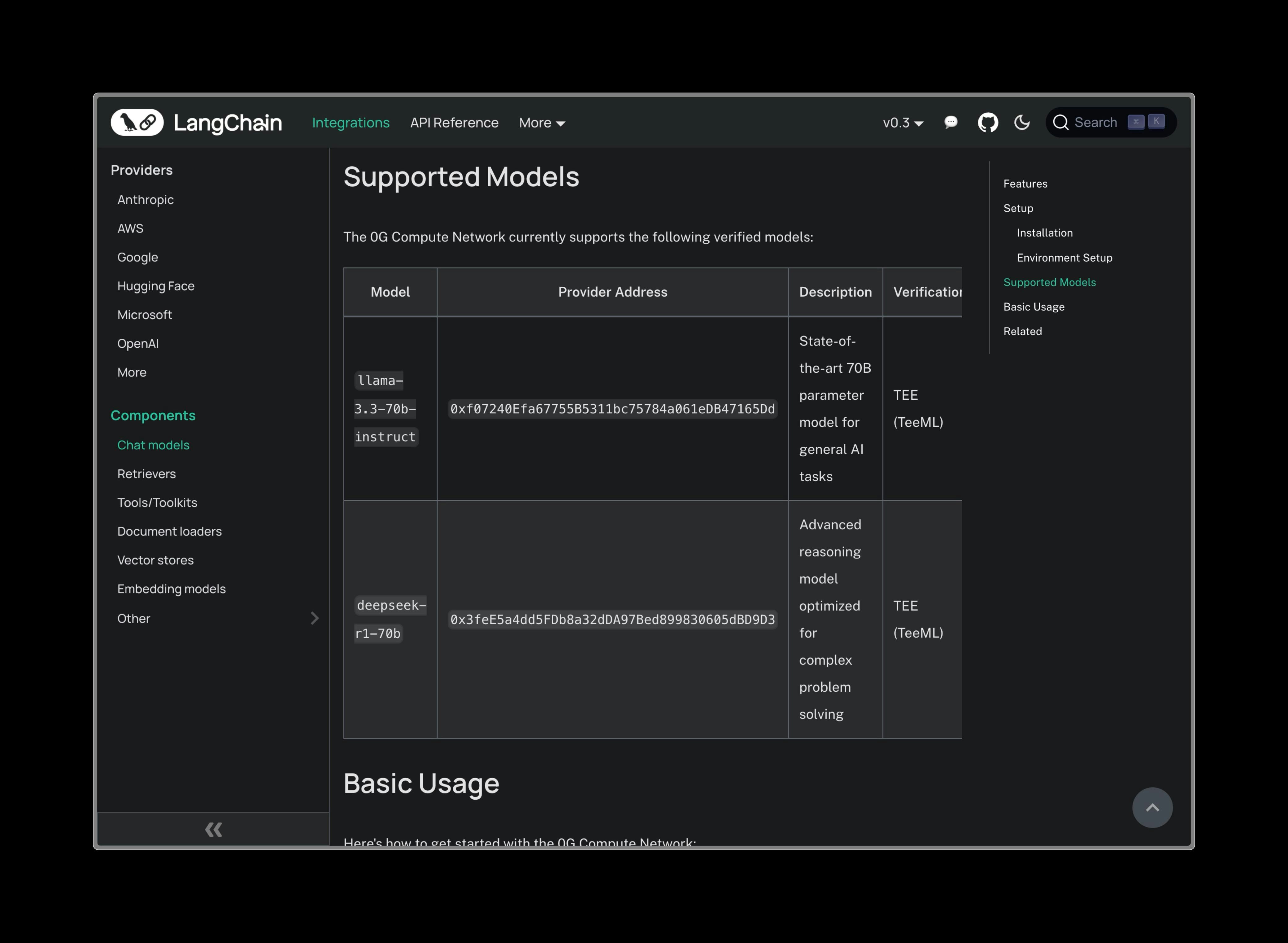 *Advanced chain operations and memory management*
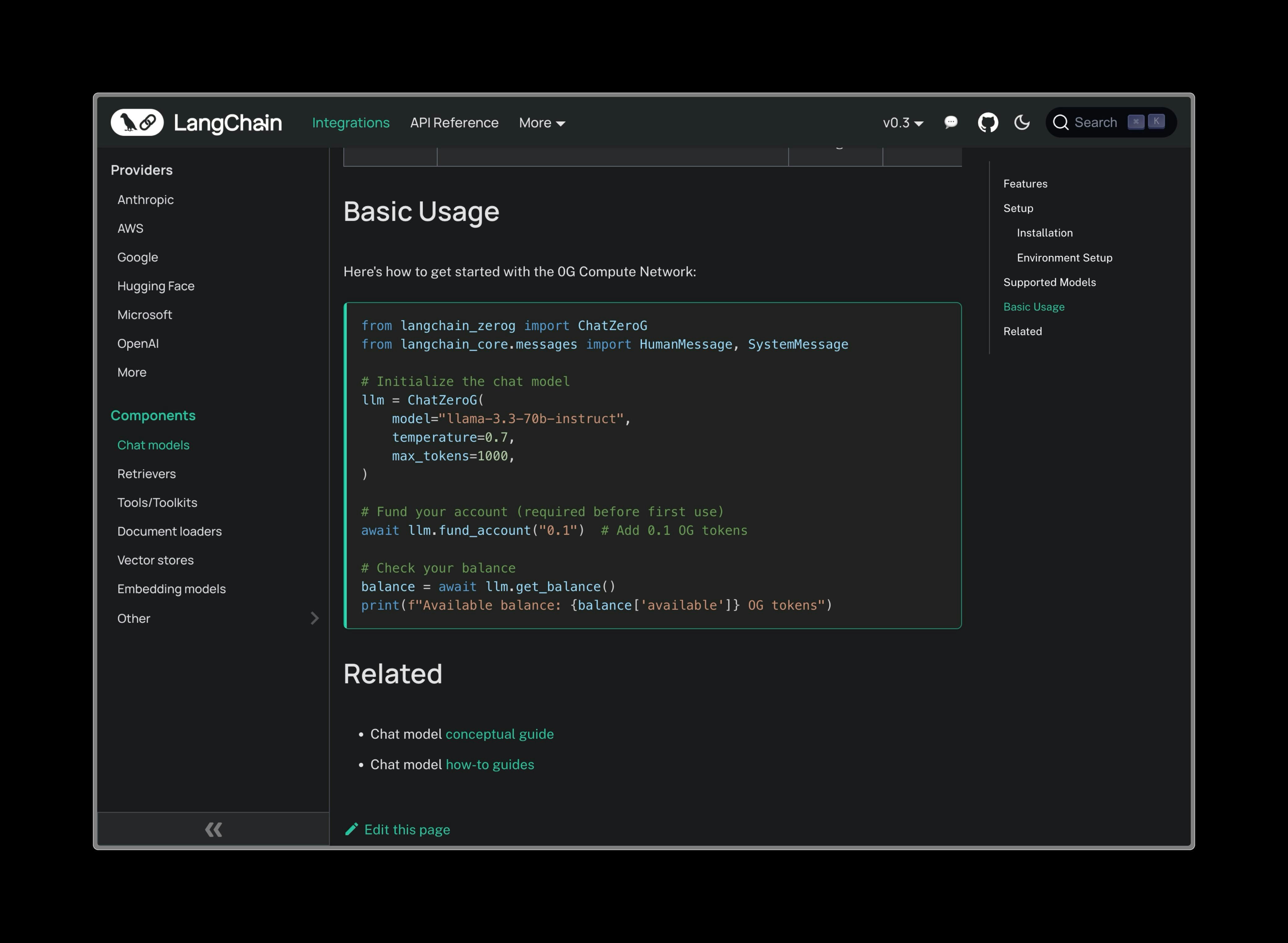 *Agent implementation with tool integration and reasoning*
## Overview
LangChain is the most popular framework for building LLM applications, providing tools for chains, agents, memory management, and retrieval-augmented generation (RAG). The 0G integration brings decentralized compute to LangChain's powerful ecosystem.
### What is LangChain?
LangChain is a framework for developing applications powered by language models. It enables developers to:
* **Chain Operations**: Connect LLM calls with other computations or data sources
* **Build Agents**: Create autonomous systems that can use tools and make decisions
* **Manage Memory**: Maintain conversation context and long-term memory
* **Implement RAG**: Combine retrieval with generation for knowledge-based applications
## Installation
Once the integration is merged, you'll be able to install it with:
```bash theme={null}
pip install langchain-nebula
```
## Supported Models
| Model | Provider Address | Best For |
| -------------------------- | -------------------------------------------- | -------------------------------------------- |
| **llama-3.3-70b-instruct** | `0xf07240Efa67755B5311bc75784a061eDB47165Dd` | General conversations, content generation |
| **deepseek-r1-70b** | `0x3feE5a4dd5FDb8a32dDA97Bed899830605dBD9D3` | Complex reasoning, analysis, problem-solving |
## Basic Usage
```python theme={null}
from langchain_0g import ZGChat
from langchain.schema import HumanMessage, SystemMessage
# Initialize with 0G provider
llm = ZGChat(
provider_address="0xf07240Efa67755B5311bc75784a061eDB47165Dd", # llama-3.3-70b-instruct
private_key="your-private-key",
temperature=0.7,
max_tokens=1000
)
# Simple chat
response = llm.invoke([
SystemMessage(content="You are a helpful AI assistant."),
HumanMessage(content="Explain quantum computing in simple terms.")
])
print(response.content)
```
## Advanced Features
### Chains
Build complex workflows by chaining multiple operations:
```python theme={null}
from langchain.chains import LLMChain
from langchain.prompts import PromptTemplate
# Create a prompt template
prompt = PromptTemplate(
input_variables=["topic", "audience"],
template="Explain {topic} to a {audience} audience in a clear and engaging way."
)
# Create chain with 0G LLM
chain = LLMChain(
llm=ZGChat(
provider_address="0xf07240Efa67755B5311bc75784a061eDB47165Dd",
private_key="your-private-key"
),
prompt=prompt
)
# Run the chain
result = chain.run(topic="blockchain technology", audience="beginner")
print(result)
```
### Agents with Tools
Create autonomous agents that can use tools:
```python theme={null}
from langchain.agents import initialize_agent, AgentType
from langchain.tools import Tool
# Define custom tools
def calculate_tool(expression: str) -> str:
"""Calculate mathematical expressions"""
try:
return str(eval(expression))
except:
return "Invalid expression"
def search_tool(query: str) -> str:
"""Search for information"""
# Implement your search logic here
return f"Search results for: {query}"
tools = [
Tool(
name="Calculator",
func=calculate_tool,
description="Useful for mathematical calculations"
),
Tool(
name="Search",
func=search_tool,
description="Useful for finding information"
)
]
# Initialize agent with 0G LLM (use deepseek for reasoning)
agent = initialize_agent(
tools=tools,
llm=ZGChat(
provider_address="0x3feE5a4dd5FDb8a32dDA97Bed899830605dBD9D3", # deepseek-r1-70b
private_key="your-private-key",
temperature=0.1
),
agent=AgentType.ZERO_SHOT_REACT_DESCRIPTION,
verbose=True
)
# Use the agent
result = agent.run("What is 15 * 24 + 100? Then search for information about that number.")
print(result)
```
### Memory & Conversation
Maintain context across multiple interactions:
```python theme={null}
from langchain.memory import ConversationBufferMemory
from langchain.chains import ConversationChain
# Create memory-enabled conversation
memory = ConversationBufferMemory()
conversation = ConversationChain(
llm=ZGChat(
provider_address="0xf07240Efa67755B5311bc75784a061eDB47165Dd",
private_key="your-private-key"
),
memory=memory,
verbose=True
)
# Have a conversation
response1 = conversation.predict(input="Hi, I'm working on a Python project.")
print("AI:", response1)
response2 = conversation.predict(input="Can you help me with error handling?")
print("AI:", response2)
response3 = conversation.predict(input="What did I mention I was working on?")
print("AI:", response3)
```
### RAG (Retrieval-Augmented Generation)
Combine document retrieval with generation:
```python theme={null}
from langchain.document_loaders import TextLoader
from langchain.text_splitter import CharacterTextSplitter
from langchain.embeddings import OpenAIEmbeddings
from langchain.vectorstores import Chroma
from langchain.chains import RetrievalQA
# Load and split documents
loader = TextLoader("documents.txt")
documents = loader.load()
text_splitter = CharacterTextSplitter(chunk_size=1000, chunk_overlap=0)
texts = text_splitter.split_documents(documents)
# Create embeddings and vector store
embeddings = OpenAIEmbeddings()
vectorstore = Chroma.from_documents(texts, embeddings)
# Create RAG chain with 0G LLM
qa_chain = RetrievalQA.from_chain_type(
llm=ZGChat(
provider_address="0x3feE5a4dd5FDb8a32dDA97Bed899830605dBD9D3", # deepseek for analysis
private_key="your-private-key",
temperature=0.2
),
chain_type="stuff",
retriever=vectorstore.as_retriever()
)
# Ask questions about your documents
result = qa_chain.run("What are the key findings in the documents?")
print(result)
```
## Configuration Options
### Model Selection
Choose the right model for your use case:
```python theme={null}
# For creative tasks and general conversation
creative_llm = ZGChat(
provider_address="0xf07240Efa67755B5311bc75784a061eDB47165Dd", # llama-3.3-70b
temperature=0.8, # Higher creativity
max_tokens=2000
)
# For analytical and reasoning tasks
analytical_llm = ZGChat(
provider_address="0x3feE5a4dd5FDb8a32dDA97Bed899830605dBD9D3", # deepseek-r1-70b
temperature=0.1, # More focused
max_tokens=3000
)
```
### Network Configuration
```python theme={null}
# Custom network settings
llm = ZGChat(
provider_address="0xf07240Efa67755B5311bc75784a061eDB47165Dd",
private_key="your-private-key",
rpc_url="https://custom-rpc.0g.ai", # Custom RPC endpoint
timeout=60, # Request timeout in seconds
max_retries=3 # Number of retries on failure
)
```
## Migration from OpenAI
Migrating from OpenAI to 0G is straightforward:
```python Before (OpenAI) theme={null}
from langchain.llms import OpenAI
from langchain.chains import LLMChain
llm = OpenAI(
openai_api_key="your-openai-key",
model_name="llama-3.3-70b-instruct",
temperature=0.7
)
chain = LLMChain(llm=llm, prompt=prompt)
result = chain.run(input_data)
```
```python After (0G) theme={null}
from langchain_0g import ZGChat
from langchain.chains import LLMChain
llm = ZGChat(
provider_address="0xf07240Efa67755B5311bc75784a061eDB47165Dd",
private_key="your-private-key",
temperature=0.7
)
chain = LLMChain(llm=llm, prompt=prompt)
result = chain.run(input_data)
```
## Benefits of 0G + LangChain
No dependency on centralized AI providers - your applications run on a decentralized network
Competitive pricing through the 0G compute marketplace
Decentralized infrastructure ensures your applications remain available
Trusted Execution Environment verification for secure computation
## Example Applications
### Customer Support Bot
```python theme={null}
from langchain.agents import initialize_agent
from langchain.tools import Tool
from langchain.memory import ConversationBufferWindowMemory
# Define support tools
def get_order_status(order_id: str) -> str:
# Implement order lookup
return f"Order {order_id} is being processed"
def create_ticket(issue: str) -> str:
# Implement ticket creation
return f"Ticket created for: {issue}"
tools = [
Tool(name="OrderStatus", func=get_order_status, description="Get order status"),
Tool(name="CreateTicket", func=create_ticket, description="Create support ticket")
]
# Create support agent
support_agent = initialize_agent(
tools=tools,
llm=ZGChat(
provider_address="0xf07240Efa67755B5311bc75784a061eDB47165Dd",
private_key="your-private-key"
),
memory=ConversationBufferWindowMemory(k=5),
agent=AgentType.CONVERSATIONAL_REACT_DESCRIPTION
)
# Handle customer queries
response = support_agent.run("I need help with my order #12345")
```
### Content Generation Pipeline
```python theme={null}
from langchain.chains import SequentialChain
# Create content generation pipeline
title_chain = LLMChain(
llm=creative_llm,
prompt=PromptTemplate(
input_variables=["topic"],
template="Generate an engaging title for an article about {topic}"
),
output_key="title"
)
content_chain = LLMChain(
llm=creative_llm,
prompt=PromptTemplate(
input_variables=["topic", "title"],
template="Write a comprehensive article about {topic} with the title '{title}'"
),
output_key="content"
)
# Combine chains
content_pipeline = SequentialChain(
chains=[title_chain, content_chain],
input_variables=["topic"],
output_variables=["title", "content"]
)
# Generate content
result = content_pipeline({"topic": "sustainable energy"})
print(f"Title: {result['title']}")
print(f"Content: {result['content']}")
```
## Getting Started
1. **Wait for the integration to be merged** - Track progress at [langchain-ai/langchain#33136](https://github.com/langchain-ai/langchain/pull/33136)
2. **Install the package** once available: `pip install langchain-nebula`
3. **Get your 0G credentials** - You'll need a private key for the 0G network
4. **Choose your model** based on your use case (creative vs analytical)
5. **Start building** with familiar LangChain patterns!
## Community & Support
* **GitHub**: [langchain-ai/langchain](https://github.com/langchain-ai/langchain)
* **LangChain Docs**: [python.langchain.com](https://python.langchain.com)
* **0G Discord**: Join for integration-specific support
* **Examples**: Check the integration repository for more examples once merged
*Agent implementation with tool integration and reasoning*
## Overview
LangChain is the most popular framework for building LLM applications, providing tools for chains, agents, memory management, and retrieval-augmented generation (RAG). The 0G integration brings decentralized compute to LangChain's powerful ecosystem.
### What is LangChain?
LangChain is a framework for developing applications powered by language models. It enables developers to:
* **Chain Operations**: Connect LLM calls with other computations or data sources
* **Build Agents**: Create autonomous systems that can use tools and make decisions
* **Manage Memory**: Maintain conversation context and long-term memory
* **Implement RAG**: Combine retrieval with generation for knowledge-based applications
## Installation
Once the integration is merged, you'll be able to install it with:
```bash theme={null}
pip install langchain-nebula
```
## Supported Models
| Model | Provider Address | Best For |
| -------------------------- | -------------------------------------------- | -------------------------------------------- |
| **llama-3.3-70b-instruct** | `0xf07240Efa67755B5311bc75784a061eDB47165Dd` | General conversations, content generation |
| **deepseek-r1-70b** | `0x3feE5a4dd5FDb8a32dDA97Bed899830605dBD9D3` | Complex reasoning, analysis, problem-solving |
## Basic Usage
```python theme={null}
from langchain_0g import ZGChat
from langchain.schema import HumanMessage, SystemMessage
# Initialize with 0G provider
llm = ZGChat(
provider_address="0xf07240Efa67755B5311bc75784a061eDB47165Dd", # llama-3.3-70b-instruct
private_key="your-private-key",
temperature=0.7,
max_tokens=1000
)
# Simple chat
response = llm.invoke([
SystemMessage(content="You are a helpful AI assistant."),
HumanMessage(content="Explain quantum computing in simple terms.")
])
print(response.content)
```
## Advanced Features
### Chains
Build complex workflows by chaining multiple operations:
```python theme={null}
from langchain.chains import LLMChain
from langchain.prompts import PromptTemplate
# Create a prompt template
prompt = PromptTemplate(
input_variables=["topic", "audience"],
template="Explain {topic} to a {audience} audience in a clear and engaging way."
)
# Create chain with 0G LLM
chain = LLMChain(
llm=ZGChat(
provider_address="0xf07240Efa67755B5311bc75784a061eDB47165Dd",
private_key="your-private-key"
),
prompt=prompt
)
# Run the chain
result = chain.run(topic="blockchain technology", audience="beginner")
print(result)
```
### Agents with Tools
Create autonomous agents that can use tools:
```python theme={null}
from langchain.agents import initialize_agent, AgentType
from langchain.tools import Tool
# Define custom tools
def calculate_tool(expression: str) -> str:
"""Calculate mathematical expressions"""
try:
return str(eval(expression))
except:
return "Invalid expression"
def search_tool(query: str) -> str:
"""Search for information"""
# Implement your search logic here
return f"Search results for: {query}"
tools = [
Tool(
name="Calculator",
func=calculate_tool,
description="Useful for mathematical calculations"
),
Tool(
name="Search",
func=search_tool,
description="Useful for finding information"
)
]
# Initialize agent with 0G LLM (use deepseek for reasoning)
agent = initialize_agent(
tools=tools,
llm=ZGChat(
provider_address="0x3feE5a4dd5FDb8a32dDA97Bed899830605dBD9D3", # deepseek-r1-70b
private_key="your-private-key",
temperature=0.1
),
agent=AgentType.ZERO_SHOT_REACT_DESCRIPTION,
verbose=True
)
# Use the agent
result = agent.run("What is 15 * 24 + 100? Then search for information about that number.")
print(result)
```
### Memory & Conversation
Maintain context across multiple interactions:
```python theme={null}
from langchain.memory import ConversationBufferMemory
from langchain.chains import ConversationChain
# Create memory-enabled conversation
memory = ConversationBufferMemory()
conversation = ConversationChain(
llm=ZGChat(
provider_address="0xf07240Efa67755B5311bc75784a061eDB47165Dd",
private_key="your-private-key"
),
memory=memory,
verbose=True
)
# Have a conversation
response1 = conversation.predict(input="Hi, I'm working on a Python project.")
print("AI:", response1)
response2 = conversation.predict(input="Can you help me with error handling?")
print("AI:", response2)
response3 = conversation.predict(input="What did I mention I was working on?")
print("AI:", response3)
```
### RAG (Retrieval-Augmented Generation)
Combine document retrieval with generation:
```python theme={null}
from langchain.document_loaders import TextLoader
from langchain.text_splitter import CharacterTextSplitter
from langchain.embeddings import OpenAIEmbeddings
from langchain.vectorstores import Chroma
from langchain.chains import RetrievalQA
# Load and split documents
loader = TextLoader("documents.txt")
documents = loader.load()
text_splitter = CharacterTextSplitter(chunk_size=1000, chunk_overlap=0)
texts = text_splitter.split_documents(documents)
# Create embeddings and vector store
embeddings = OpenAIEmbeddings()
vectorstore = Chroma.from_documents(texts, embeddings)
# Create RAG chain with 0G LLM
qa_chain = RetrievalQA.from_chain_type(
llm=ZGChat(
provider_address="0x3feE5a4dd5FDb8a32dDA97Bed899830605dBD9D3", # deepseek for analysis
private_key="your-private-key",
temperature=0.2
),
chain_type="stuff",
retriever=vectorstore.as_retriever()
)
# Ask questions about your documents
result = qa_chain.run("What are the key findings in the documents?")
print(result)
```
## Configuration Options
### Model Selection
Choose the right model for your use case:
```python theme={null}
# For creative tasks and general conversation
creative_llm = ZGChat(
provider_address="0xf07240Efa67755B5311bc75784a061eDB47165Dd", # llama-3.3-70b
temperature=0.8, # Higher creativity
max_tokens=2000
)
# For analytical and reasoning tasks
analytical_llm = ZGChat(
provider_address="0x3feE5a4dd5FDb8a32dDA97Bed899830605dBD9D3", # deepseek-r1-70b
temperature=0.1, # More focused
max_tokens=3000
)
```
### Network Configuration
```python theme={null}
# Custom network settings
llm = ZGChat(
provider_address="0xf07240Efa67755B5311bc75784a061eDB47165Dd",
private_key="your-private-key",
rpc_url="https://custom-rpc.0g.ai", # Custom RPC endpoint
timeout=60, # Request timeout in seconds
max_retries=3 # Number of retries on failure
)
```
## Migration from OpenAI
Migrating from OpenAI to 0G is straightforward:
```python Before (OpenAI) theme={null}
from langchain.llms import OpenAI
from langchain.chains import LLMChain
llm = OpenAI(
openai_api_key="your-openai-key",
model_name="llama-3.3-70b-instruct",
temperature=0.7
)
chain = LLMChain(llm=llm, prompt=prompt)
result = chain.run(input_data)
```
```python After (0G) theme={null}
from langchain_0g import ZGChat
from langchain.chains import LLMChain
llm = ZGChat(
provider_address="0xf07240Efa67755B5311bc75784a061eDB47165Dd",
private_key="your-private-key",
temperature=0.7
)
chain = LLMChain(llm=llm, prompt=prompt)
result = chain.run(input_data)
```
## Benefits of 0G + LangChain
No dependency on centralized AI providers - your applications run on a decentralized network
Competitive pricing through the 0G compute marketplace
Decentralized infrastructure ensures your applications remain available
Trusted Execution Environment verification for secure computation
## Example Applications
### Customer Support Bot
```python theme={null}
from langchain.agents import initialize_agent
from langchain.tools import Tool
from langchain.memory import ConversationBufferWindowMemory
# Define support tools
def get_order_status(order_id: str) -> str:
# Implement order lookup
return f"Order {order_id} is being processed"
def create_ticket(issue: str) -> str:
# Implement ticket creation
return f"Ticket created for: {issue}"
tools = [
Tool(name="OrderStatus", func=get_order_status, description="Get order status"),
Tool(name="CreateTicket", func=create_ticket, description="Create support ticket")
]
# Create support agent
support_agent = initialize_agent(
tools=tools,
llm=ZGChat(
provider_address="0xf07240Efa67755B5311bc75784a061eDB47165Dd",
private_key="your-private-key"
),
memory=ConversationBufferWindowMemory(k=5),
agent=AgentType.CONVERSATIONAL_REACT_DESCRIPTION
)
# Handle customer queries
response = support_agent.run("I need help with my order #12345")
```
### Content Generation Pipeline
```python theme={null}
from langchain.chains import SequentialChain
# Create content generation pipeline
title_chain = LLMChain(
llm=creative_llm,
prompt=PromptTemplate(
input_variables=["topic"],
template="Generate an engaging title for an article about {topic}"
),
output_key="title"
)
content_chain = LLMChain(
llm=creative_llm,
prompt=PromptTemplate(
input_variables=["topic", "title"],
template="Write a comprehensive article about {topic} with the title '{title}'"
),
output_key="content"
)
# Combine chains
content_pipeline = SequentialChain(
chains=[title_chain, content_chain],
input_variables=["topic"],
output_variables=["title", "content"]
)
# Generate content
result = content_pipeline({"topic": "sustainable energy"})
print(f"Title: {result['title']}")
print(f"Content: {result['content']}")
```
## Getting Started
1. **Wait for the integration to be merged** - Track progress at [langchain-ai/langchain#33136](https://github.com/langchain-ai/langchain/pull/33136)
2. **Install the package** once available: `pip install langchain-nebula`
3. **Get your 0G credentials** - You'll need a private key for the 0G network
4. **Choose your model** based on your use case (creative vs analytical)
5. **Start building** with familiar LangChain patterns!
## Community & Support
* **GitHub**: [langchain-ai/langchain](https://github.com/langchain-ai/langchain)
* **LangChain Docs**: [python.langchain.com](https://python.langchain.com)
* **0G Discord**: Join for integration-specific support
* **Examples**: Check the integration repository for more examples once merged